# App Creation

Head on over to the official Discord Developer dashboard and log in.

{% embed url="<https://discord.com/developers/>" %}

You should be greeted with a page that resembles this one but without all of the Bots there seeing as you won't have made any yet.

<figure><img src="https://2147477058-files.gitbook.io/~/files/v0/b/gitbook-x-prod.appspot.com/o/spaces%2FH1bI9ixcBaQjQlzO9gnV%2Fuploads%2FOwfFupOAlLlNPHnqg5E1%2Fimage.png?alt=media&#x26;token=20c54c17-f914-416d-a996-5e75889d171f" alt=""><figcaption></figcaption></figure>

In the top right of the page, click on 'New Application'.

<figure><img src="https://2147477058-files.gitbook.io/~/files/v0/b/gitbook-x-prod.appspot.com/o/spaces%2FH1bI9ixcBaQjQlzO9gnV%2Fuploads%2FB7xCg0hYV5WnopsM8wnf%2Fimage.png?alt=media&#x26;token=77f8b357-02f3-4c0e-94c0-03625fdf7048" alt=""><figcaption></figcaption></figure>

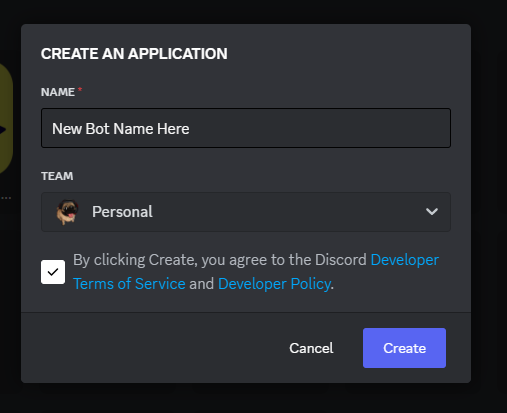
Give your bot a name and agree to the terms of service, then click on 'Create'.

<figure><img src="https://2147477058-files.gitbook.io/~/files/v0/b/gitbook-x-prod.appspot.com/o/spaces%2FH1bI9ixcBaQjQlzO9gnV%2Fuploads%2FlTVBjFK2YAojNrnzOQ0D%2Fimage.png?alt=media&#x26;token=fb320b9b-ef96-4db3-b562-fa503ce7dd10" alt=""><figcaption></figcaption></figure>

Below is your general Application Overview. You can click on the generated icon to upload a new image for your Bot. By default it just uses letters relating to your bots name. Make sure to click the Save button that pops up at the bottom after any changes.

<figure><img src="https://2147477058-files.gitbook.io/~/files/v0/b/gitbook-x-prod.appspot.com/o/spaces%2FH1bI9ixcBaQjQlzO9gnV%2Fuploads%2FEsh62IJUXUBHkT9xHO9A%2Fimage.png?alt=media&#x26;token=ab50deb6-5e63-4ed7-8be7-6ae6b22faecd" alt=""><figcaption></figcaption></figure>

On the left side navigation, click on OAuth2

<figure><img src="https://2147477058-files.gitbook.io/~/files/v0/b/gitbook-x-prod.appspot.com/o/spaces%2FH1bI9ixcBaQjQlzO9gnV%2Fuploads%2F4IH9cXHslu38mNaTrwrY%2Fimage.png?alt=media&#x26;token=c7eb2220-8ee8-4aee-bbdf-7228ddceaa04" alt=""><figcaption></figcaption></figure>

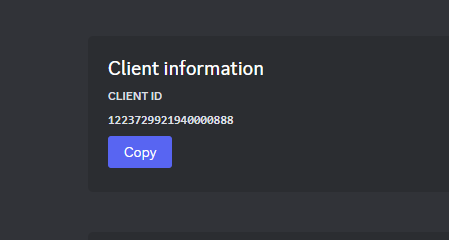
And on this page, take note of the Client ID, we will need this late for our environment variables file we will create for the bot.

<figure><img src="https://2147477058-files.gitbook.io/~/files/v0/b/gitbook-x-prod.appspot.com/o/spaces%2FH1bI9ixcBaQjQlzO9gnV%2Fuploads%2Fo1dQ8tsisQmXzWlNIYrb%2Fimage.png?alt=media&#x26;token=2dd314c7-374d-4d5a-93ff-b80b99b1fcd2" alt=""><figcaption></figcaption></figure>

Now click on Bot button in the navigation

<figure><img src="https://2147477058-files.gitbook.io/~/files/v0/b/gitbook-x-prod.appspot.com/o/spaces%2FH1bI9ixcBaQjQlzO9gnV%2Fuploads%2FeXvSmZYKXH56fSOo1JW7%2Fimage.png?alt=media&#x26;token=09f3cc72-3c88-4393-a61b-5031e8d10668" alt=""><figcaption></figcaption></figure>

If you scroll down a little you will see some options that you can toggle. If the bot is only meant for your server, toggle off the Public Bot option. Also if required, toggle on the Server Members Intent option. (Make sure to click on the Save button that appears to save these changes)<br>

<figure><img src="https://2147477058-files.gitbook.io/~/files/v0/b/gitbook-x-prod.appspot.com/o/spaces%2FH1bI9ixcBaQjQlzO9gnV%2Fuploads%2FiRNF2aN0z8Ujj23Lpi1A%2Fimage.png?alt=media&#x26;token=53793ba3-8316-47f5-91b2-020b308062bd" alt=""><figcaption></figcaption></figure>

If you scroll back upwards, just under the Bot's name there is a Token part. To initially get your Bot's token you will need to reset it. Click on the reset button and then on 'Yes, do it'. If you have 2FA enabled, which you should do, you will need to enter this here.

<figure><img src="https://2147477058-files.gitbook.io/~/files/v0/b/gitbook-x-prod.appspot.com/o/spaces%2FH1bI9ixcBaQjQlzO9gnV%2Fuploads%2FqKU4SO3pnLelLDyIOEVj%2Fimage.png?alt=media&#x26;token=216e0069-f09f-4d16-b5c1-d2c9b1f7d65c" alt=""><figcaption></figcaption></figure>

<figure><img src="https://2147477058-files.gitbook.io/~/files/v0/b/gitbook-x-prod.appspot.com/o/spaces%2FH1bI9ixcBaQjQlzO9gnV%2Fuploads%2FWVxLitg8zjwi9wgHroVr%2Fimage.png?alt=media&#x26;token=488061f9-7997-4e06-841b-9f9b65ce70bf" alt=""><figcaption></figcaption></figure>

<figure><img src="https://2147477058-files.gitbook.io/~/files/v0/b/gitbook-x-prod.appspot.com/o/spaces%2FH1bI9ixcBaQjQlzO9gnV%2Fuploads%2FYOYIN07GBLKr2jpgsccB%2Fimage.png?alt=media&#x26;token=875049e0-6007-46cb-8c4e-5e685def5e8d" alt=""><figcaption></figcaption></figure>

A long line of random characters will now appear, take note of this as we will also need this later for our environment variables file.&#x20;

{% hint style="warning" %}
Never give this Token to anyone, it gives the ability to act on your Bot's behalf. If it is compromised, come back and Reset it again. This application was deleted after this Guide so nothing it at risk.
{% endhint %}

<figure><img src="https://2147477058-files.gitbook.io/~/files/v0/b/gitbook-x-prod.appspot.com/o/spaces%2FH1bI9ixcBaQjQlzO9gnV%2Fuploads%2FMuT068YgixwwUmgl0Ixj%2Fimage.png?alt=media&#x26;token=56e6a888-bf0d-4149-87ef-c3f286905187" alt=""><figcaption></figcaption></figure>

### Congratulations, you've created a Discord Application!